Features
Every file Chrome should already open — beautifully.
Nine formats. Real renderers. Zero upload. Everything below works on local files and remote URLs — same UI, same shortcuts, same speed.
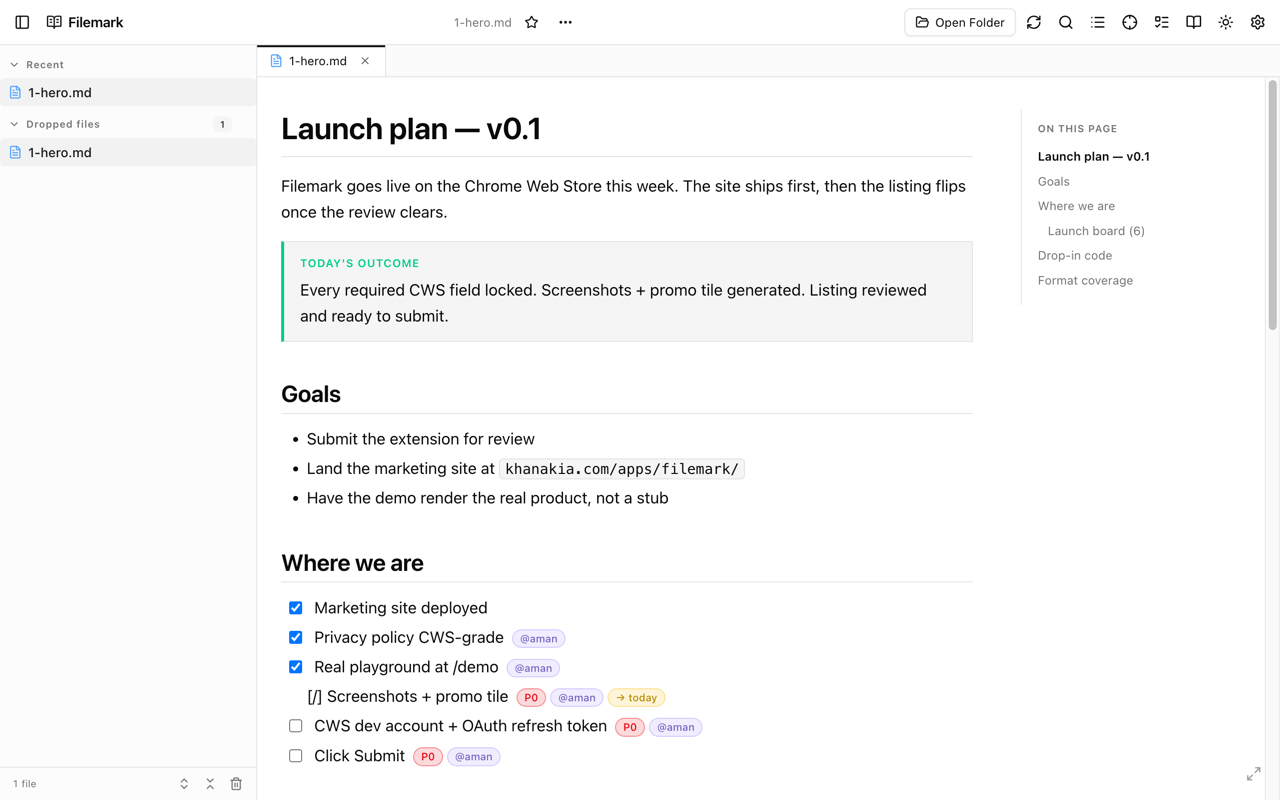
Markdown · MDX
GitHub-flavored markdown — with components you can drop in.
Full GFM, syntax-highlighted code via shiki, KaTeX math, Mermaid diagrams, and a library of inline components — callouts, tabs, ADRs, kanban boards, charts — all from plain text.
- Tables · task lists · footnotes · autolinks · strikethrough
- KaTeX math (inline $x$ and block $$…$$)
- Mermaid — flowchart, sequence, class, state, ER, gantt, journey, mindmap, timeline, sankey, Wardley, architecture, treemap
- Shiki syntax highlighting — TS · JS · Python · Go · Rust · SQL · 20+ languages, themed in sync with the UI
- <Callout>, <Tabs>, <Details>, <ADR>, <Kanban>, <Chart>, <Datagrid>, <Schema>
- Wiki-links [[Page]] · backlinks panel · linked-mention graph
- Frontmatter chip strip, table of contents that follows your scroll, anchor links per heading
- Code block toolbar — copy, wrap/scroll toggle, language label
- Markmap / mindmap rendering inside ```markmap fences
- Persistent task checkboxes — flip them in the viewer, state survives reload
- Shortcode emoji (:smile:) and HTML-in-markdown when you need an escape hatch
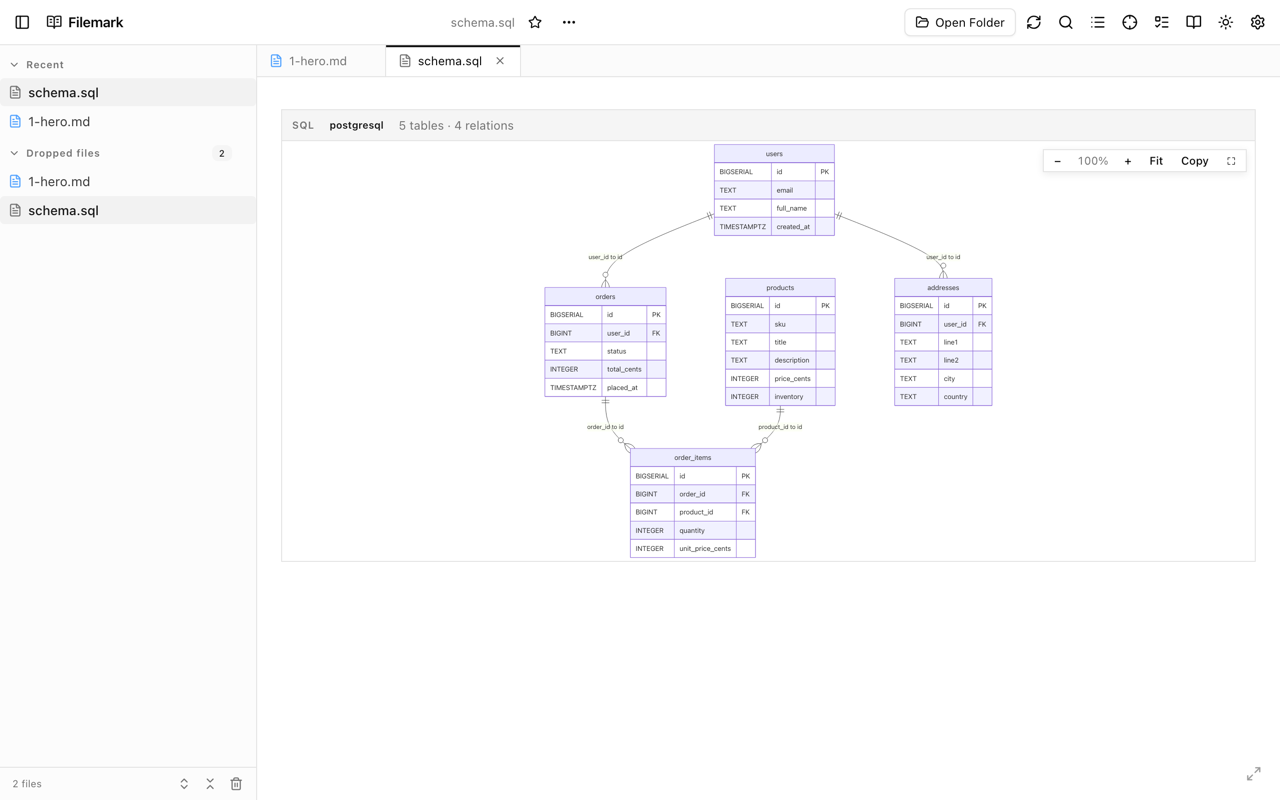
SQL · Prisma · DBML
Schemas → interactive entity-relationship diagrams.
Drop a .sql, .prisma, or .dbml file and Filemark renders an interactive ER diagram with foreign keys and indexes. Doesn't parse cleanly? Falls back to syntax-highlighted source — you never lose the file.
- Dialects — PostgreSQL · MySQL · SQLite · ClickHouse
- Prisma schema syntax (.prisma) supported natively
- DBML (.dbml) supported natively
- Drag tables around the canvas; FK arrows stay tracked
- Indexes and unique constraints rendered as chips on each table
- Resizable tables, zoom + pan canvas, mini-map for big schemas
- Search box jumps to a table by name
- Cytoscape graph engine — handles hundreds of tables without lag
- Graceful fallback to highlighted source on parse failure (so a broken .sql still opens)
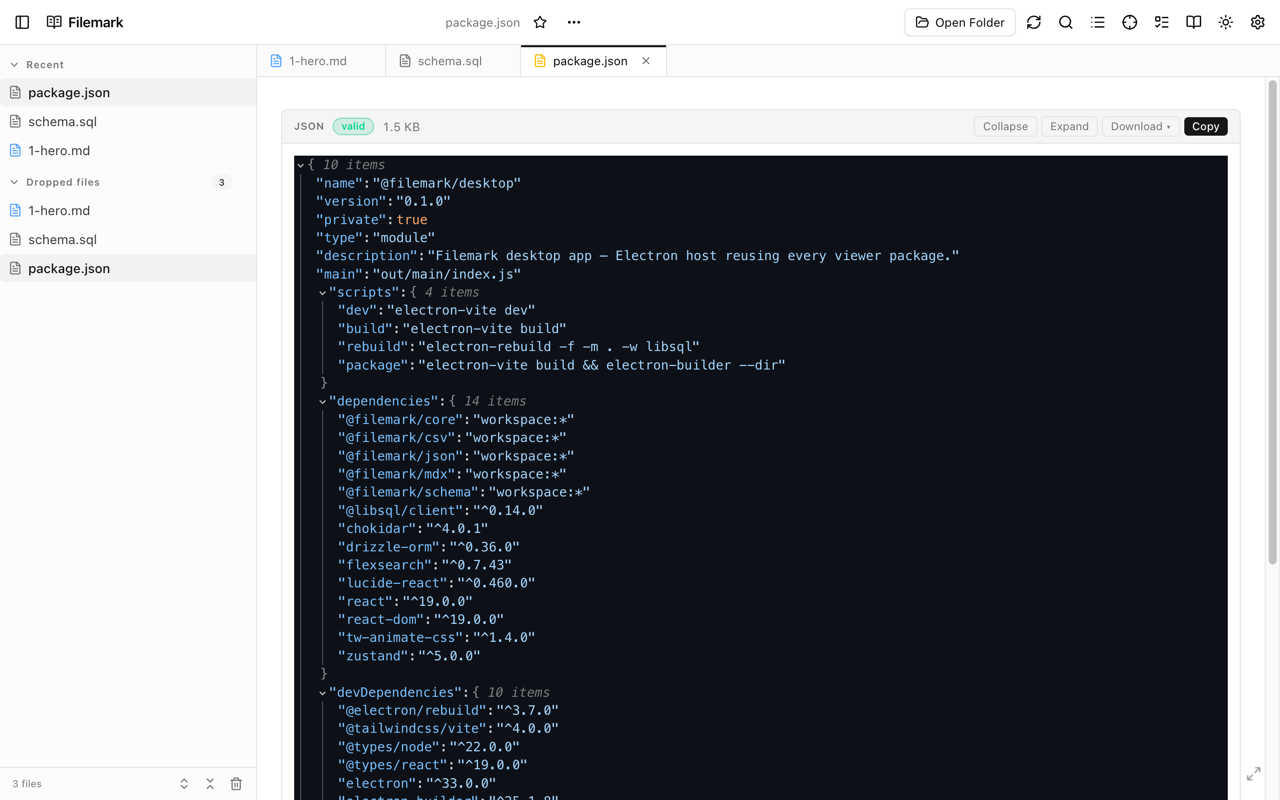
JSON · JSONC
JSON as a collapsible tree, nine themes, line-numbered errors.
Drop a JSON or JSONC (JSON with comments, like tsconfig.json) and read it the way it deserves — a collapsible tree, type chips, clipboard on every node, and line-numbered parse errors when a comma misbehaves.
- Nine themes — githubDark, nord, monokai, gruvbox, vscode, basic, dark, light, githubLight
- Collapsible tree with configurable default depth (None · 1–5)
- Type chips — string, number, boolean, array, object
- Copy any value or full JSON path with one click
- Configurable string truncation (drag-slider, 0–400 chars)
- Toggle data-type labels and object-size badges per preference
- Line-numbered parse errors when a comma or bracket misbehaves
- JSONC — // and /* */ comments, trailing commas — no errors
- Configurable indent for copy (0–8 spaces)
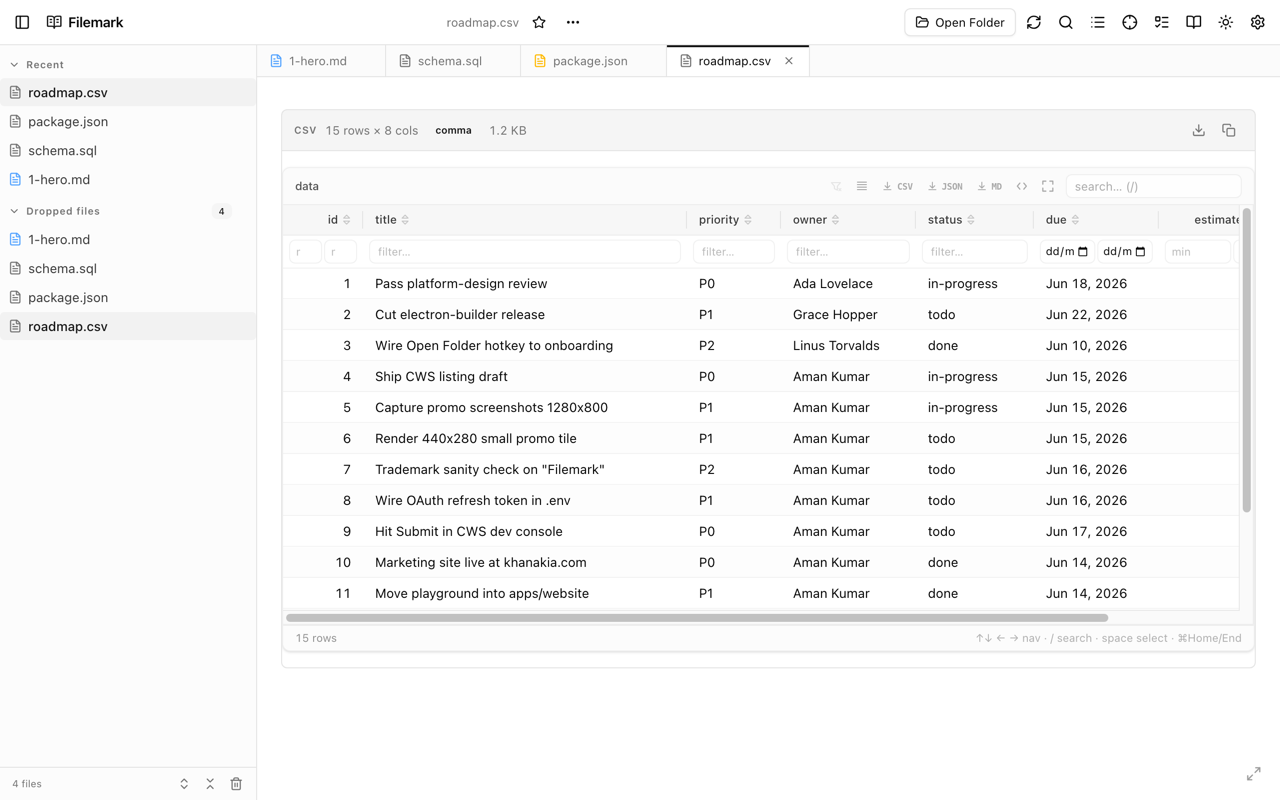
CSV · TSV
CSV and TSV as a sortable, filterable datagrid.
Sort, filter, resize columns — type-aware cells (status badges, tag chips, ratings, currency, dates) via simple fence-meta hints. Export filtered rows back to CSV, Markdown, or JSON.
- Sort by any column, multi-column secondary sort
- Per-column filter inputs — partial match, range, set membership
- Type-aware cells — status badges, tag chips, star ratings, currency, dates
- Fence-meta hints in markdown (```csv {currency:price}) for typed columns
- Resizable column widths, persisted per file
- Pin / freeze the first column for wide tables
- Export selection (filtered view) to CSV, Markdown, or JSON
- TSV out of the box — tab-separated falls back to the same datagrid
- Virtualized rows — thousands of records without scroll jank
Tasks · Kanban
Tasks in plain markdown, rendered as a board.
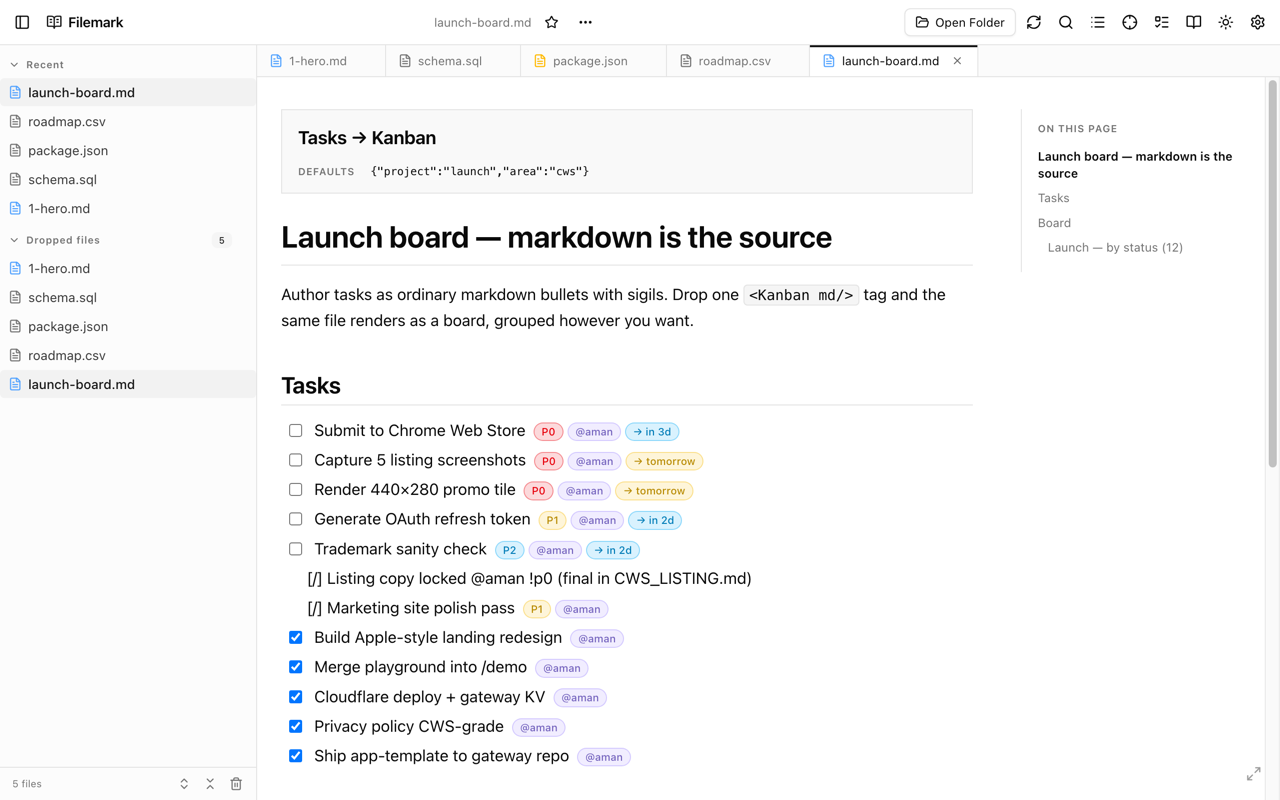
Author tasks as ordinary markdown bullets with @owner, !priority, ~due, (project) sigils. Add a <Kanban md/> tag and the same file renders as a board — grouped by status, priority, owner, due-bucket, whatever you want.
- Sigil syntax — @owner, !priority (p0/p1/…), ~due (YYYY-MM-DD), (project)
- <TaskList filter="…"> — render a filtered subset anywhere
- <Kanban md/> — same source, board view
- <TaskStats> — counts by status / priority / owner / project
- <TaskTimeline> — Gantt-style strip over a date range
- Group by status, priority, owner, due-bucket — your choice
- Drag tasks across columns; sigil rewrites in source
- Cross-file task panel — every task in every file, one dashboard
- Filter DSL — status:doing & !p:p0 & ~:overdue
- Checkbox state persists per file across reloads
Web URLs
Render remote .md / .json / .sql URLs in place.
Open a raw URL on github, gist, gitlab, or any site — Filemark replaces the page with its rendered view, URL bar untouched. Back / forward / bookmarks all keep working.
In-place rendering
- URL bar stays at the original .md / .json / .sql / .csv / .prisma / .dbml
- Browser back / forward navigate exactly like a normal page
- Bookmarks land on the renderable URL, not a chrome-extension://… proxy
- Works on pages served with Content-Security-Policy: sandbox (raw.github, gists, gitlab raw)
- Works on Cloudflare-protected pages — reads cookies from the parent context
Opt-in permission
- Disabled by default — Filemark cannot read any web page on a fresh install
- Single toggle in Options → 'Render remote files' grants the optional *://*/* permission
- Standard Chrome permission prompt — you accept it once
- Revoke any time from the same toggle (Chrome removes the permission immediately)
Web Docs sidebar
- Every remote URL you open auto-saves to a 'Web docs' list in the sidebar
- Last 30 URLs, newest first, deduplicated by URL
- Host shown as subtitle so you can scan at a glance
- Synced across browser tabs via chrome.storage.local — open in one tab, see it in another
- Same list visible in the standalone Filemark app
Open in full Filemark
- TopBar button on every injected page opens the standalone viewer in a new tab
- Standalone app fetches the URL through your granted host permission
- Switch to library mode for multi-file sessions, drag in folders, use ⌘K search across all files
Library
A real file manager, in a browser tab.
Drop folders, drop files, drop URLs — Filemark builds a sidebar around them with stars, recents, tags, search, and live disk sync.
Folders
- Drag-drop a folder — recursive walk skips node_modules, .git, dist, build
- File System Access (FSA) handles persist across reloads
- Live sync — files added/removed on disk show up without a manual reload
- Auto-refresh polling (toggle + interval in Options) for FSA folders
- Per-folder root path display, rename folder, label custom name
- 'Reconnect folder' when Chrome forgets a handle (rare)
- Hierarchical tree with per-folder collapse state, persisted
Files
- Drag-drop loose files anywhere on the page
- Stable Recent list — clicking a file does NOT move it to the top (muscle memory matters)
- Star any file — Starred section pinned to sidebar top
- Custom tags per file; tag filter narrows the library
- Per-file actions menu — rename, copy path, remove, star, tags
- Folder open-in-OS, Reveal-in-Finder, Open-in-editor (Cursor / VS Code / Zed) when path is known
- Subtitles in filtered views — show parent folder so duplicates are distinguishable
Sidebar
- Collapsible, resizable — drag the right edge to set width (persisted)
- Sections: Starred · Recent · Web docs · Dropped · Folders
- Per-section open/close state, persisted
- Per-folder tree collapse state, persisted
- Per-folder scoped ⌘K search (magnifier icon on hover)
- 'Reveal active file in sidebar' — expand every parent + scroll to row + flash highlight
- Expand-all / collapse-all toolbar icons
Auto-refresh
- Toggle in the TopBar (RefreshCw icon turns green when on)
- Polls the active file plus every FSA folder on a configurable interval
- Default 2s; adjustable from 500ms upward
- On window focus + tab visibility — re-walks every FSA folder for cheap sync
Viewer
Reader chrome that gets out of the way.
Top bar with every action you need; reading + fullscreen modes when you want nothing else on screen.
Reading modes
- Raw mode — toggle to syntax-highlighted source any time
- Reading mode (⇧F) — hides Sidebar + Tasks panel, keeps TopBar + TabStrip
- Fullscreen (F) — hides every chrome, edge-to-edge viewer
- Escape exits any mode
TopBar
- Open Folder · Search · TOC toggle · Tasks panel toggle
- Reveal-in-Sidebar (Crosshair icon)
- Auto-refresh toggle (green when on)
- Theme popover (light · dark · sepia · custom + font/size/line-height sliders)
- FileActions menu — rename · copy path · open in editor · reveal in Finder
- Open-in-Full-Filemark button in inject mode
- Settings link to the Options page
Customization
Themes, typography, every shortcut rebindable.
Three built-in themes plus your own. Reset any slider individually. Every shortcut adjustable from Options.
Themes
- Light · dark · sepia, plus example custom themes (neon, solarized)
- Theme tokens via shadcn — drop in your own CSS to add a theme
- Persists across reloads + syncs across Chrome profiles via chrome.storage.sync
- Auto follows system color scheme on first install
Typography
- Font family — sans · serif · mono (sliders, individually resettable)
- Font size · line height · content width sliders
- Live preview — drag a slider, see the active file re-flow
- Reset all from the Danger Zone in Options
Keyboard shortcuts
- Every shortcut listed in Options with its current binding
- Click any chord to rebind — press the key combo you want
- Bindings use physical key position so they work on every layout (Turkish Q, AZERTY, Dvorak, …)
- Reset to default per shortcut · Disable-all toggle for conflict relief
- Conflict warnings in-line when two shortcuts share a key
Per-format toggles
- Enable / disable each of the nine supported formats independently
- Disabled = Filemark stops intercepting → falls back to Chrome's default handling
- JSON viewer options surface separately — theme, depth, truncation, types, sizes, clipboard
- Settings sync across Chrome profiles via chrome.storage.sync
Privacy · performance
Files stay on your device. Renderers stay fast.
No server. No analytics. No remote code. Lazy-loaded grammars. Audit it yourself in DevTools.
100% client-side
- No outbound requests during normal use — verify in DevTools' Network tab
- No analytics, no telemetry, no crash reporting
- Manifest V3 strict CSP — no unsafe-eval, no remote code execution at runtime
- Every rendering library is bundled at build time and shipped with the extension
- Narrow host_permissions: file:///* only — broader access is opt-in via Options
Performance
- Lazy-loaded shiki language grammars — only the languages your file uses
- Code-split Mermaid, KaTeX, db-schema-toolkit chunks
- IndexedDB-backed library — opens thousands of files without bog
- Direct-DOM injection on web URLs — no iframe overhead, no double-fetch
- Service worker stays asleep when nothing's happening
Open source · MIT
- Source at github.com/thesatellite-ai/filemark — audit the manifest, the renderer, the request graph
- Every permission declared with a written justification on the listing
- Issues + PRs welcome
Try it
See it in the browser. Install when it clicks.
The demo runs every renderer in the playground — same code as the extension. No install required, no account needed.